Produkt - Ceník
Informace Partnerství Kontakt
Uživatelský manuál - přehled témat

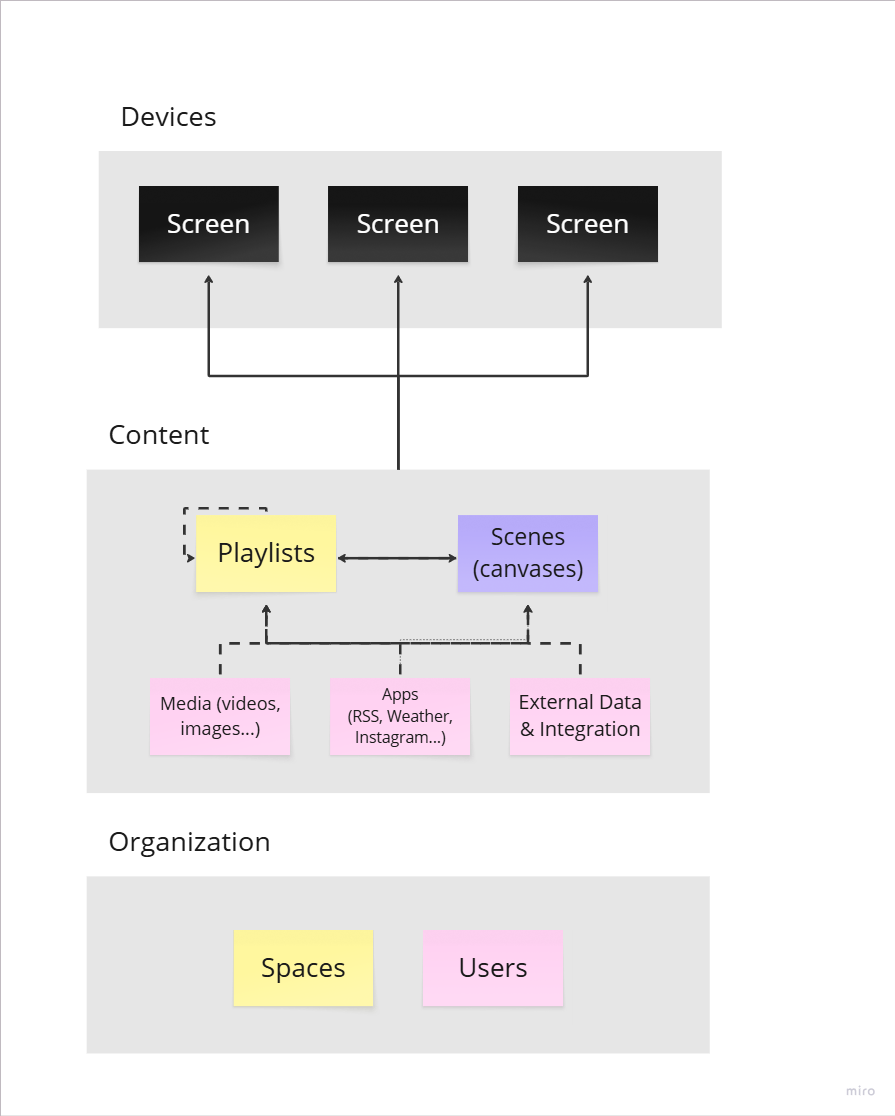
Overview of ScreenManager ecosystem
ScreenManager is a cloud-based Digital Signage platform that allows you to remotely manage your screens and content from anywhere.
You can upload media (images, videos, documents), add Apps or external data, set up its scheduling to create Playlists or entire Scenes and remotely publish your content onto screens.
You can manage user permissions to control who can access or edit playlists by creating workspaces that allow you to divide your account into multiple sub-accounts with different permission levels.
After you log into your account you will see a menu bar on the left, that allows you to access various settings.
Below is a general overview of the most important settings in the menu:

Screens (hardware)1
Screens serve as content players connected to displays or act as standalone displays themselves, such as Android TVs or LG WebOS devices. These hardware devices are remotely managed, allowing for seamless updates to their version and scheduling automated power on/off based on predefined schedules. ScreenManager can also enforce lock down of the devices and its USB ports, protecting them from unauthorized manipulation.
Additionally, ScreenManager monitors these devices, providing notifications in case of:
- Device loses internet connection;
- Device is turned off;
- Unstable internet connection;
And much more.
Playlists2
Playlists are a fundamental organizing tool for content. They facilitate scheduling and enable the creation of custom layouts by dividing screens into zones, with each zone capable of displaying different content. Playlists can also be nested, allowing for easy sharing of content across multiple branches or organizational levels.
You can also use playlists with AI audience sensors, so that content automatically changes based on the demographics of whoever is viewing the screen.
Media3
Media encompasses every piece of content displayed on screens, including images, videos, PDF presentations. Content can be uploaded from a user's computer.
Scenes4
Scenes serve as dynamic canvases where different media and applications are combined to create visually engaging content. Scenes can be included in playlists or published directly to screens.
Apps5
Learn how to connect ScreenManager with different external applications and systems. Also contains data integrations focused on analytics and reporting.
Tags6
Tags are labels for your media files and devices, that help you organize your screens or manage automatic content updates across multiple Playlists and Spaces.
Integrations7
Contains data integrations focused on analytics and reporting and allows you to connect ScreenManager with different external applications and systems.
My Organization8
My Organization allows you to manage Accounts, Users, their permissions and access levels, create and manage Spaces, manage security settings, set up notifications and alerts and more.
A user is an individual authorized to manage an account as an admin or oversee one or more spaces as a regular user. User settings can be found inside of the My Organization tab.
My Profile settings9
These settings allow you to set up and manage your Profile, Notification and Security Settings and how to Sign Out.
Spaces10
Spaces function as sub-accounts within an organization, allowing for hierarchical organization and management. Learn more about spaces in the My Organization section.
By understanding these essential components of digital signage hardware and content management, businesses can effectively leverage ScreenManager and other tools to deliver impactful visual experiences to their audience.

- info@screenmanager.tech
- +420 604 487 886 (WhatsApp)
DIČ: CZ08543682
Kurzova 2222/16 155 00
Praha